
Welcome to TameSupport
Prepare your AI assistant, connect email and chat, and handle conversations with your team.
TameSupport handles customer requests over email and chat using your company’s information and procedures. When a person is needed, the request is handed over with the conversation context.
Find your way around
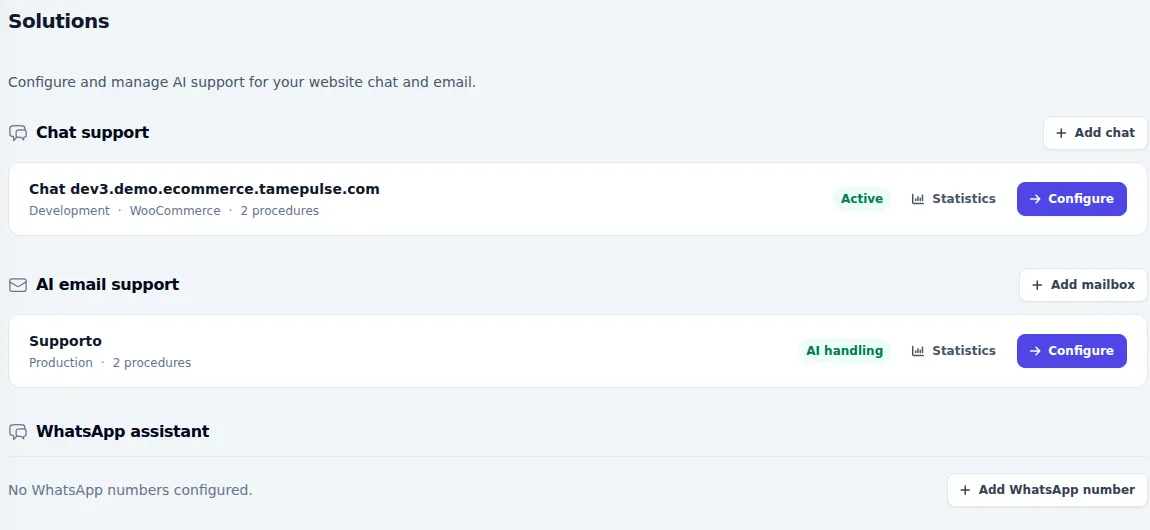
Open Solutions to find the assistants connected to your channels. Each solution has its own configuration, procedures and testing area. The Knowledge Base holds the information the assistant can consult; Conversations is your team’s workspace.
Recommended path
- Check your access and initial setup.
- Prepare your company information and link it to the right procedures.
- Define when the assistant may answer and when it must involve your team.
- Connect the agreed website chat or email inbox.
- Try real questions, review the answers and check the operator handover.
Assisted installation and Managed service
Standard installation is free and assisted. With the Managed service, configuration and response improvements are handled according to the agreed activities. These guides help you understand and use the system; they do not require you to carry out every technical task yourself. Custom integration development is quoted separately.
Before you start
Sign in with your team account and select the right company. Available sections depend on your role and enabled channels. If a described control is missing, ask your account administrator before creating additional configurations.