
Connect chat to your website
Check your website connection and prepare the chat channel with the required procedures and tests.
Prerequisites and assisted installation
You need the website to connect and a contact with access to its configuration. Standard installation is free and assisted: the technical connection is checked during activation. Editing a solution requires the appropriate role.
Check your chat channel
- Open Solutions and select Configure for your chat support solution.
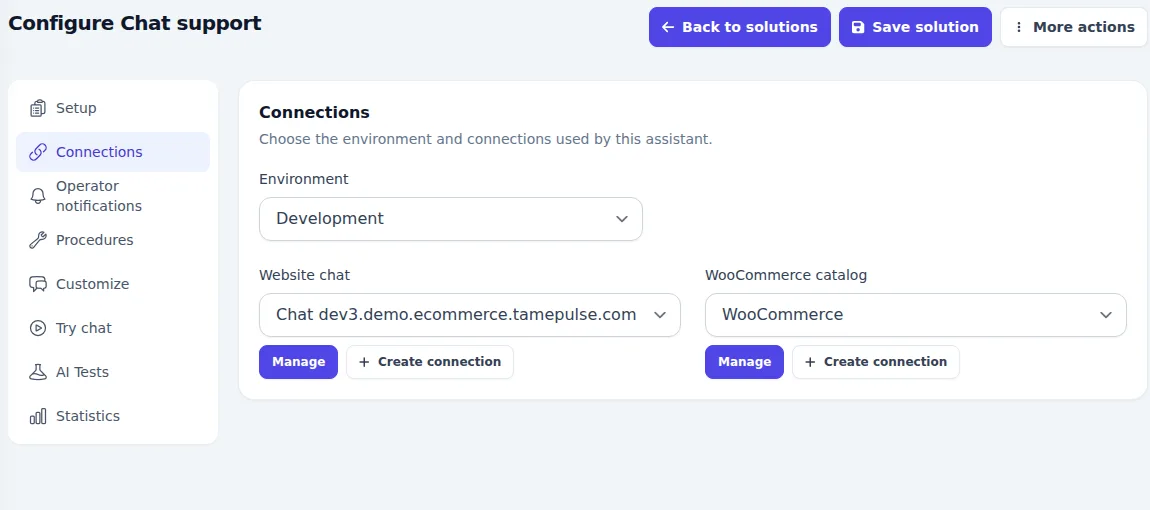
- In Connections, check the environment and visitor chat connection associated with the correct website.
- Check the enabled procedures. A catalogue connection is needed only for features that require product data; it is not required for every chat.
- In Customize, review the messages and options available for your setup.
- Work with your installation contact to add the chat component to your website. Use the intended connection’s settings, not those from another project.
- Open the website as a visitor and test chat visibility, the first reply and team handover. Check on a smartphone too.
Expected result
Visitors can open chat on the intended website and their conversations reach the correct channel. The assistant uses that solution’s linked procedures.
If chat is missing or does not answer
- Check with your contact that website installation is complete and published.
- Review the solution’s status and any incomplete requirements in Setup.
- If only certain pages are affected, check the website component, cache and agreed display rules.
- If messages arrive but replies are unexpected, check procedures and sources before changing the website connection.
Special connections or channels outside standard installation are assessed and quoted separately.